# Basketball 21

## Basketball M.O.D.s (Macros On Demand) <a href="#baseball-21" id="baseball-21"></a>

| <img src="https://1789109166-files.gitbook.io/~/files/v0/b/gitbook-x-prod.appspot.com/o/spaces%2F5Pbu0ytXByfDjSSpsNex%2Fuploads%2FC2nAje9OT1uPy12SLTq8%2FBASKETBALL_SERIES_512.png?alt=media&#x26;token=1281d10f-4e76-4e5d-a7fa-159b80841188" alt="" data-size="original"> |
| -------------------------------------------------------------------------------------------------------------------------------------------------------------------------------------------------------------------------------------------------------------------------- |
| For STRIKEPACK™ with M.O.D.\|PASS™                                                                                                                                                                                                                                         |
| **Version**:  1.1.5                                                                                                                                                                                                                                                        |
| **Type**:  <mark style="color:green;">**Modern**</mark> - Sports                                                                                                                                                                                                           |
| **Status**:  <mark style="color:green;">**Updated By Request**</mark>                                                                                                                                                                                                      |
| **Updated**:  2021.04.15                                                                                                                                                                                                                                                   |

Basketball 21 GAMEPACK is available for use with NBA, 2021 release.  <mark style="color:red;">**This pack**</mark> <mark style="color:red;"></mark><mark style="color:red;">"</mark><mark style="color:red;">**may**</mark><mark style="color:red;">"</mark> <mark style="color:red;"></mark><mark style="color:red;">**work with more recent game releases but it hasn**</mark><mark style="color:red;">'</mark><mark style="color:red;">**t been tested with them**</mark><mark style="color:red;">!</mark> &#x20;

**How to select GAMEPACK**: [**Video**](https://youtu.be/26CBkKRbmSM)

<details>

<summary>Page Contents</summary>

[**GAMEPACK Setup**](#gamepack-setup)

[**Global M.O.D. Lucky Shot**](#global-m.o.d.-lucky-shot)

[**Class 1, 2, 3, 4 - Paddle Button M.O.D.s**](#class-1-2-3-4-paddle-button-m.o.d.s)

[**Action Repeat Setup**](#action-repeat-setup)

[**Menu Navigation**](#menu-navigation)

</details>

***

## GAMEPACK Setup

<figure><img src="https://1789109166-files.gitbook.io/~/files/v0/b/gitbook-x-prod.appspot.com/o/spaces%2F5Pbu0ytXByfDjSSpsNex%2Fuploads%2FLVJ5vXIOFKH1HXSae7T9%2FBasketball_1.png?alt=media&#x26;token=2eee7fe3-c286-4e27-a9fd-3c103baf7d7f" alt=""><figcaption><p><strong>How to Block Rumble in M.O.D. CENTRAL™</strong>: <a href="https://youtu.be/aY0wnh0fhGU?si=5psaU5ymjXyBQe_Y"><strong>Video</strong></a></p></figcaption></figure>

***

## Global M.O.D. Lucky Shot

<figure><img src="https://1789109166-files.gitbook.io/~/files/v0/b/gitbook-x-prod.appspot.com/o/spaces%2F5Pbu0ytXByfDjSSpsNex%2Fuploads%2Fv68cCY38cIiXVJzgIyGb%2FBasketball_2.png?alt=media&#x26;token=04c9576c-f334-4392-9815-bebc90e6e8a4" alt=""><figcaption></figcaption></figure>

***

## Class 1, 2, 3, 4 - Paddle Button M.O.D.s

<figure><img src="https://1789109166-files.gitbook.io/~/files/v0/b/gitbook-x-prod.appspot.com/o/spaces%2F5Pbu0ytXByfDjSSpsNex%2Fuploads%2FTVV701P9CLtfxqUYHx4U%2FBasketball_3.png?alt=media&#x26;token=a693b130-45b1-41d2-85f3-8fe933842b36" alt=""><figcaption></figcaption></figure>

<figure><img src="https://1789109166-files.gitbook.io/~/files/v0/b/gitbook-x-prod.appspot.com/o/spaces%2F5Pbu0ytXByfDjSSpsNex%2Fuploads%2FbjvDxmttsBxmYagcmdwv%2FBasketball_4.png?alt=media&#x26;token=08456e92-8023-4edf-a5d3-9b17a99389a8" alt=""><figcaption></figcaption></figure>

<figure><img src="https://1789109166-files.gitbook.io/~/files/v0/b/gitbook-x-prod.appspot.com/o/spaces%2F5Pbu0ytXByfDjSSpsNex%2Fuploads%2F42eHLSEmxTSKHK4Wa101%2FBasketball_5.png?alt=media&#x26;token=1144f93c-b53d-4a74-b2bc-bf34ab8d6722" alt=""><figcaption></figcaption></figure>

***

## Action Repeat Setup

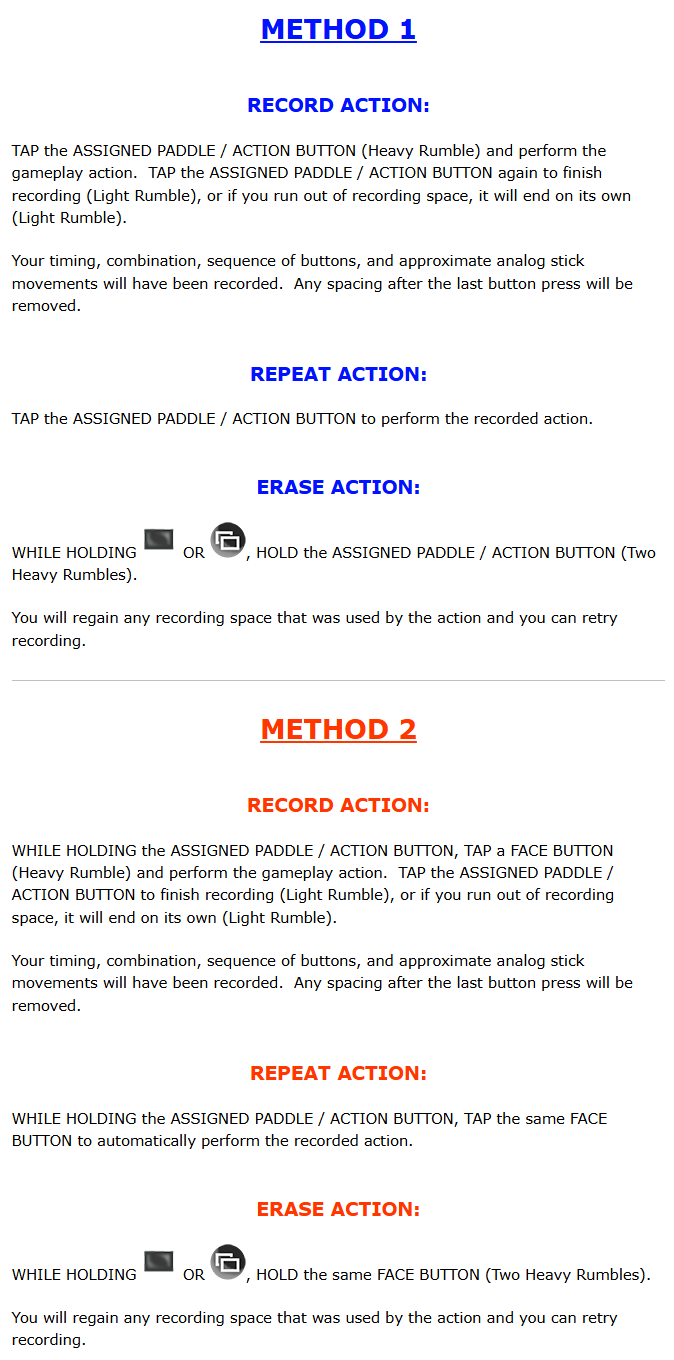
<mark style="color:blue;">**METHOD 1**</mark>**&#x20;- How to set up Action Repeat**: [**Video**](https://youtu.be/u3fT-vu5asU?si=9QDf3Le6vHaENXqF)

Action Repeat will assign the Paddle Button to a single action.

* LEFT PADDLE / BUTTON #1 is Action 1.
* RIGHT PADDLE / BUTTON #2 is Action 2.
* BUTTON #3 is Action 3.
* BUTTON #4 is Action 4.

***

<mark style="color:orange;">**METHOD 2**</mark>**&#x20;- How to set up Action Repeat** (**Face Buttons**): [**Video**](https://youtu.be/KDn0vLTRN_I?si=n5FcEGLc7uRKu_GX)

<mark style="color:orange;">**The Action Repeat**</mark> <mark style="color:orange;"></mark><mark style="color:orange;">(</mark><mark style="color:orange;">**Face Buttons**</mark><mark style="color:orange;">)</mark> <mark style="color:orange;"></mark><mark style="color:orange;">**video mentions Action 4 but that has now been removed to make room for Lucky Shot**</mark><mark style="color:orange;">!</mark>  Action Repeat (Face Buttons) will assign the Paddle Button as an activator to use with up to three face buttons.

* Triangle / Y is Action 1.
* Circle / B is Action 2.
* Cross / A is Action 3.

***

<figure><img src="https://1789109166-files.gitbook.io/~/files/v0/b/gitbook-x-prod.appspot.com/o/spaces%2F5Pbu0ytXByfDjSSpsNex%2Fuploads%2FDxROYJt9O9WtSVCxoXMB%2FBasketball_6.png?alt=media&#x26;token=3cf267e5-505c-498b-97c0-47217564f9f2" alt=""><figcaption></figcaption></figure>

***

## Menu Navigation

GAMEPACK Menu Mode lets you adjust your M.O.D. selections directly from your controller.  It involves button navigation and counting LEDs so if you find that complicated, just stick to M.O.D. CENTRAL™.

For a basic idea of how a typical GAMEPACK Menu Mode looks and works in practice, please see either [**PS Dominator**](https://youtu.be/TcuPGjGI488), [**XB Dominator**](https://youtu.be/CAeO536DViY), or [**XB Eliminator**](https://youtu.be/uZqWhN2VWUo).  Keep in mind though that the menu layout of each GAMEPACK is unique...

Numbered "**M**.**O**.**D**.**s**" are organized into categories known as "**Classes**".  While navigating Menu Mode, you will need to refer to this GAMEPACK's specific layout below:

<figure><img src="https://1789109166-files.gitbook.io/~/files/v0/b/gitbook-x-prod.appspot.com/o/spaces%2F5Pbu0ytXByfDjSSpsNex%2Fuploads%2F1EvQfUYEyCIFB0y8DxmR%2FBasketball_7.png?alt=media&#x26;token=135b0e16-2eb0-4506-b6ac-ec8734121c0c" alt=""><figcaption></figcaption></figure>

***

{% hint style="info" %} <mark style="color:blue;">**PS4**</mark><mark style="color:blue;">®:</mark>  To enter Menu Mode, <img src="https://content.gitbook.com/content/5Pbu0ytXByfDjSSpsNex/blobs/a1rU3M3zQ35D9H4Qkcsr/hold.png" alt="" data-size="line">**HOLD** <img src="https://content.gitbook.com/content/5Pbu0ytXByfDjSSpsNex/blobs/biL6sJdtwmqmdQuOtLsl/ps_dpad_left.png" alt="" data-size="line">**LEFT D**-**PAD** for at least 5 seconds, and remain <img src="https://content.gitbook.com/content/5Pbu0ytXByfDjSSpsNex/blobs/a1rU3M3zQ35D9H4Qkcsr/hold.png" alt="" data-size="line">**HOLDING** <img src="https://content.gitbook.com/content/5Pbu0ytXByfDjSSpsNex/blobs/biL6sJdtwmqmdQuOtLsl/ps_dpad_left.png" alt="" data-size="line">**LEFT D**-**PAD** to stay in Menu Mode:

Count the <mark style="color:green;">**Green LED flashes**</mark> to get the number of the selected <mark style="color:green;">**Class**</mark>.  By default, that's <mark style="color:green;">**Class 1**</mark>, so it'll flash once (1x) on repeat.  <mark style="color:green;">**Class 2**</mark> flashes 2x on repeat, <mark style="color:green;">**Class 3**</mark> flashes 3x on repeat, etc.

<img src="https://content.gitbook.com/content/5Pbu0ytXByfDjSSpsNex/blobs/sKdciZQF9hlNPAO0LWyb/tap.png" alt="" data-size="line">**TAP** the following buttons to navigate:

* <img src="https://1789109166-files.gitbook.io/~/files/v0/b/gitbook-x-prod.appspot.com/o/spaces%2F5Pbu0ytXByfDjSSpsNex%2Fuploads%2Fy4dB5e0q8vLiycMzjGMR%2Fsquare_new.png?alt=media&#x26;token=49d1de86-1299-476d-add6-f512b167c166" alt="SQUARE" data-size="line"> goes :arrow\_up:<mark style="color:green;">**Up**</mark> a <mark style="color:green;">**Class**</mark> number *(> <mark style="color:green;">**2**</mark> > <mark style="color:green;">**3**</mark>...)*.
* <img src="https://1789109166-files.gitbook.io/~/files/v0/b/gitbook-x-prod.appspot.com/o/spaces%2F5Pbu0ytXByfDjSSpsNex%2Fuploads%2Fqrd7uRQAxeV9TKcxWEfJ%2Fcross_new.png?alt=media&#x26;token=9e63b1f6-5ea5-48b5-8a8a-8e78e3bd179e" alt="CROSS" data-size="line"> goes :arrow\_down:<mark style="color:green;">**Down**</mark> a <mark style="color:green;">**Class**</mark> number *(...> <mark style="color:green;">**2**</mark> > <mark style="color:green;">**1**</mark>)*.
* **Paddle Button** instantly jumps to its related **Class** number *(feature may be unavailable)*.

Once you've selected a <mark style="color:green;">**Class**</mark>, similarly count the <mark style="color:purple;">**Purple LED flashes**</mark> to get the number of its <mark style="color:purple;">**Enabled M**</mark><mark style="color:purple;">.O.</mark><mark style="color:purple;">**D**</mark><mark style="color:purple;">.</mark>.  No purple flash is **M**.**O**.**D**. **Disabled** *(**0**)*.  *Most* <mark style="color:green;">**Classes**</mark> have a **0**/**OFF** state that they default to.

* <img src="https://1789109166-files.gitbook.io/~/files/v0/b/gitbook-x-prod.appspot.com/o/spaces%2F5Pbu0ytXByfDjSSpsNex%2Fuploads%2FUhHoXqZMDIDOlvnesiFO%2Ftriangle_centered_new.png?alt=media&#x26;token=7a5f7600-c48d-4dbf-b216-4fc2077a029b" alt="TRIANGLE" data-size="line"> goes :arrow\_up:<mark style="color:purple;">**Up**</mark> an <mark style="color:purple;">**Enabled M**</mark><mark style="color:purple;">.O.</mark><mark style="color:purple;">**D**</mark><mark style="color:purple;">.</mark> number *(> <mark style="color:purple;">**1**</mark> > <mark style="color:purple;">**2**</mark> > <mark style="color:purple;">**3**</mark>...)*.
* <img src="https://1789109166-files.gitbook.io/~/files/v0/b/gitbook-x-prod.appspot.com/o/spaces%2F5Pbu0ytXByfDjSSpsNex%2Fuploads%2FD17Gm4pc7jU2j7p3pXbE%2Fcircle_new.png?alt=media&#x26;token=8038daaf-66c4-4413-adfe-f6c71516fc0b" alt="CIRCLE" data-size="line"> goes :arrow\_down:<mark style="color:purple;">**Down**</mark> an <mark style="color:purple;">**Enabled M**</mark><mark style="color:purple;">.O.</mark><mark style="color:purple;">**D**</mark><mark style="color:purple;">.</mark> number *(...> <mark style="color:purple;">**2**</mark> > <mark style="color:purple;">**1**</mark> > **0**)*.
  {% endhint %}

{% hint style="success" %} <mark style="color:green;">**Xbox**</mark><mark style="color:green;">®:</mark>  To enter Menu Mode, <img src="https://content.gitbook.com/content/5Pbu0ytXByfDjSSpsNex/blobs/a1rU3M3zQ35D9H4Qkcsr/hold.png" alt="" data-size="line">**HOLD** <img src="https://content.gitbook.com/content/5Pbu0ytXByfDjSSpsNex/blobs/iKdIzADrwlvxeTyLyh0K/dpad_left.png" alt="" data-size="line">**LEFT D**-**PAD** for at least 5 seconds, and remain <img src="https://content.gitbook.com/content/5Pbu0ytXByfDjSSpsNex/blobs/a1rU3M3zQ35D9H4Qkcsr/hold.png" alt="" data-size="line">**HOLDING** <img src="https://content.gitbook.com/content/5Pbu0ytXByfDjSSpsNex/blobs/iKdIzADrwlvxeTyLyh0K/dpad_left.png" alt="" data-size="line">**LEFT D**-**PAD** to stay in Menu Mode:

Count the **White LED flashes** to get the number of the selected **Class**.  By default, that's **Class 1**, so it'll flash once (1x) on repeat.  **Class 2** flashes 2x on repeat, **Class 3** flashes 3x on repeat, etc.

<img src="https://content.gitbook.com/content/5Pbu0ytXByfDjSSpsNex/blobs/sKdciZQF9hlNPAO0LWyb/tap.png" alt="" data-size="line">**TAP** the following buttons to navigate:

* <img src="https://1789109166-files.gitbook.io/~/files/v0/b/gitbook-x-prod.appspot.com/o/spaces%2F5Pbu0ytXByfDjSSpsNex%2Fuploads%2FZwUIDwVcNrRGfwd5UnI3%2Fx_new.png?alt=media&#x26;token=161ab45a-99a9-481f-8f2b-5cc31b713064" alt="X" data-size="line"> goes :arrow\_up:**Up** a **Class** number *(> **2** > **3**...)*.
* <img src="https://1789109166-files.gitbook.io/~/files/v0/b/gitbook-x-prod.appspot.com/o/spaces%2F5Pbu0ytXByfDjSSpsNex%2Fuploads%2FJHob32FVU8UE7f0q7am6%2Fa_new.png?alt=media&#x26;token=8c8cf622-47ed-4673-80e3-cc1cecfbeb63" alt="A" data-size="line"> goes :arrow\_down:**Down** a **Class** number *(...> **2** > **1**)*.
* **Paddle Button** instantly jumps to its related **Class** number *(feature may be unavailable)*.

Once you've selected a **Class**, similarly count the <mark style="color:green;">**Green LED flashes**</mark> to get the number of its <mark style="color:green;">**Enabled M**</mark><mark style="color:green;">.O.</mark><mark style="color:green;">**D**</mark><mark style="color:green;">.</mark>.  No green flash is **M**.**O**.**D**. **Disabled** *(**0**)*.  *Most* **Classes** have a **0**/**OFF** state that they default to.

* <img src="https://1789109166-files.gitbook.io/~/files/v0/b/gitbook-x-prod.appspot.com/o/spaces%2F5Pbu0ytXByfDjSSpsNex%2Fuploads%2FNScu3IbxiiEiGoJIaZWW%2Fy_new.png?alt=media&#x26;token=050b9cd9-04f4-48b9-b115-f97190226910" alt="Y" data-size="line"> goes :arrow\_up:<mark style="color:green;">**Up**</mark> an <mark style="color:green;">**Enabled M**</mark><mark style="color:green;">.O.</mark><mark style="color:green;">**D**</mark><mark style="color:green;">.</mark> number *(> <mark style="color:green;">**1**</mark> > <mark style="color:green;">**2**</mark> > <mark style="color:green;">**3**</mark>...)*.
* <img src="https://1789109166-files.gitbook.io/~/files/v0/b/gitbook-x-prod.appspot.com/o/spaces%2F5Pbu0ytXByfDjSSpsNex%2Fuploads%2FPtWQorJLxtZDSDNBBjwG%2Fb_new.png?alt=media&#x26;token=c0bbd649-2057-4aa1-b44e-6c9e0388378c" alt="B" data-size="line"> goes :arrow\_down:<mark style="color:green;">**Down**</mark> an <mark style="color:green;">**Enabled M**</mark><mark style="color:green;">.O.</mark><mark style="color:green;">**D**</mark><mark style="color:green;">.</mark> number *(...> <mark style="color:green;">**2**</mark> > <mark style="color:green;">**1**</mark> > **0**)*.
  {% endhint %}


---

# Agent Instructions: Querying This Documentation

If you need additional information that is not directly available in this page, you can query the documentation dynamically by asking a question.

Perform an HTTP GET request on the current page URL with the `ask` query parameter:

```
GET https://collectiveminds.gitbook.io/strikepackmp/guides/moderngamepacks/basketballseries/basketball21.md?ask=<question>
```

The question should be specific, self-contained, and written in natural language.
The response will contain a direct answer to the question and relevant excerpts and sources from the documentation.

Use this mechanism when the answer is not explicitly present in the current page, you need clarification or additional context, or you want to retrieve related documentation sections.