

Attack Mode | Sea of T

While
HOLDING
DOWN D-PAD,
TAP RIGHT TRIGGER
.
While
.
Expand if using a PS4®-compatible STRIKEPACK™ workaround on the PC version.
Rapid Attack: While HOLDING  , TAP
, TAP 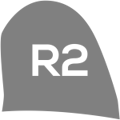 .
.
Rapid Fire Cannon: While HOLDING , TAP  .
.
Rapid Attack: FULLY HOLD down RIGHT TRIGGER to continuously attack as quickly as possible. LESS THAN fully held will attack normally.
Expand if using a PS4®-compatible STRIKEPACK™ workaround on the PC version.
Rapid Attack: FULLY HOLD down to continuously attack as quickly as possible. LESS THAN fully held will attack normally.
Rapid Fire Cannon: FULLY HOLD down RIGHT TRIGGER to continuously fire your cannon, automatically reloading after each shot, and minimizing the downtime between shots. LESS THAN fully held will fire your cannon normally.
Expand if using a PS4®-compatible STRIKEPACK™ workaround on the PC version.
Rapid Fire Cannon: FULLY HOLD down to continuously fire your cannon, automatically reloading after each shot, and minimizing the downtime between shots. LESS THAN fully held will fire your cannon normally.
Last updated